GLM-5.2 Update: Upgraded AI Slides, Better Artifacts, and a New Presentation Editor
 Wasim · 25 Aug 2026
What's New in GLM-5.2
Z.ai — the platform behind the GLM (General Language Model) series and the ChatGLM assistant, built by the Tsinghua University spin-off formerly known as Zhipu AI — has pushed out a GLM-5.2 update. The release note is short and direct: "GLM-5.2 Now Available." Five headline improvements ship with it, spanning presentation generation, coding artifacts, document handling, writing, and roleplay:
- AI Slides Upgraded — "One prompt, full presentation."
- Better Artifacts — "Near production-ready pages."
- Long-document Boost — "Get key info instantly."
- Fluent Long-form Writing — "Richer style, more human."
- Immersive Roleplay — "Consistent in long chats."
Taken together, these point at the same theme most frontier model updates chase this cycle: less prompting friction to get a finished, usable output — a full slide deck, a working page, or the key facts out of a long document — instead of a rough draft that still needs heavy editing.
AI Slides: One Prompt, Full Presentation
The first and most visible change is to GLM's AI Slides feature. Instead of iterating prompt-by-prompt to build a deck, the upgrade is aimed at going from a single prompt to a complete, structured presentation in one pass — covering the outline, slide layout, and content together rather than as separate steps.
That slide-generation upgrade is paired with a rebuilt editor, covered in detail below.
Better Artifacts: Near Production-Ready Pages
GLM's Artifacts — generated interactive pages, apps, and components rendered directly from a prompt — are described as producing "near production-ready pages" in this update. The practical implication is fewer follow-up passes to fix layout, styling, or broken interactivity before an Artifact is something you'd actually ship or embed, rather than a rough prototype that needs a developer to finish.
Long-Document Boost: Get Key Info Instantly
The long-document handling improvement targets a familiar pain point: dropping a lengthy report, contract, or paper into a chat and waiting through slow, shallow summarization. GLM-5.2's boost is aimed at surfacing the key information from long documents instantly, rather than requiring multiple back-and-forth prompts to drill into specifics.
Fluent Long-Form Writing: Richer Style, More Human
For long-form generation — essays, articles, reports — the update promises richer style and output that reads as more human, addressing the flat, formulaic tone that's a common complaint about LLM-generated long-form text.
Immersive Roleplay: Consistent in Long Chats
The roleplay improvement focuses on consistency across long chats — keeping a character, persona, or narrative voice stable deep into an extended conversation, rather than drifting or losing track of established context as the chat history grows.
New Editing & Template Saving Features for the Presentation Tool
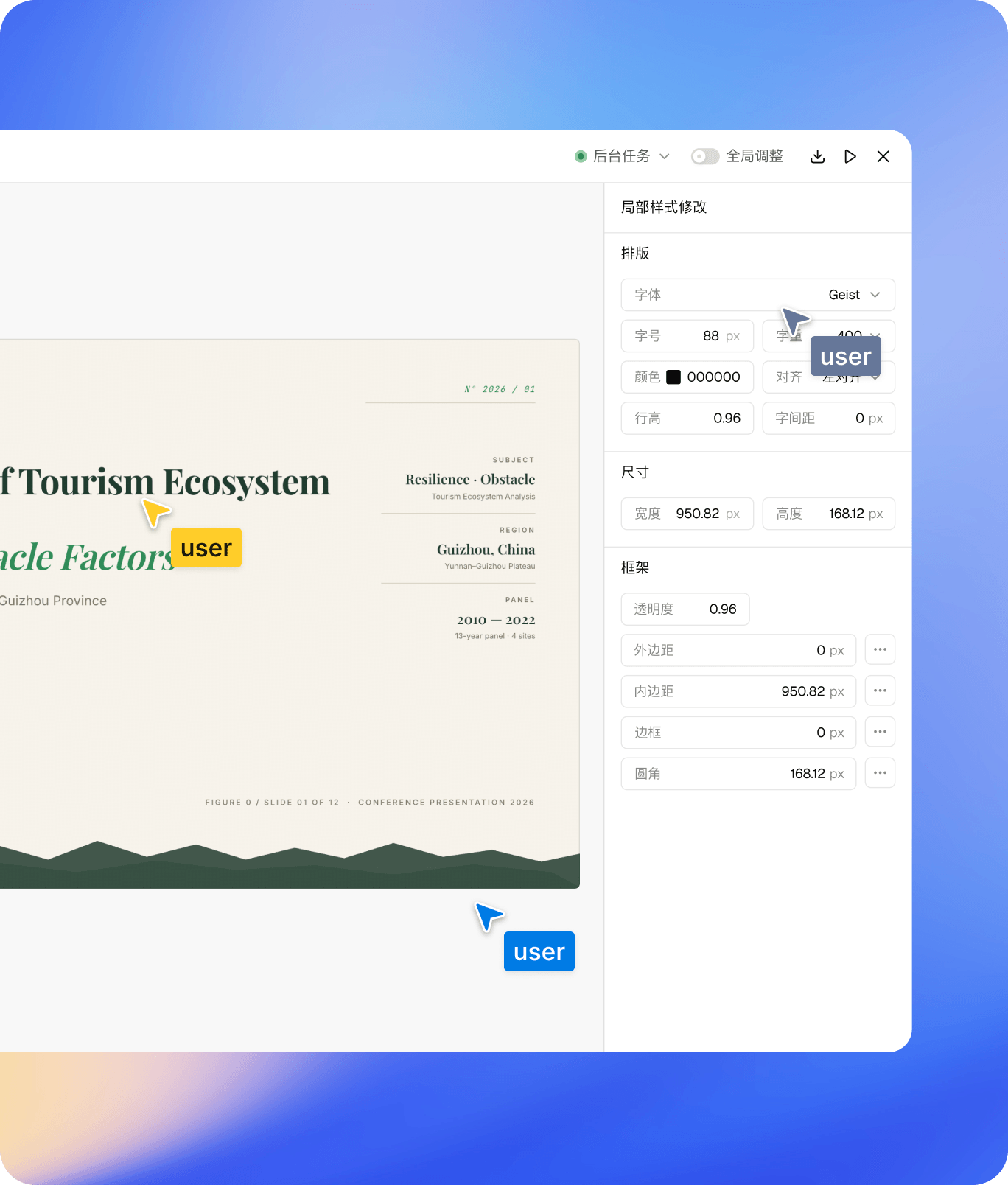
Alongside the GLM-5.2 model update, Z.ai also shipped a brand-new version of its presentation tool, with fully upgraded editing capabilities. According to Z.ai:
"A brand-new version of our presentation tool is available now with fully upgraded editing capabilities. You can freely edit content and adjust slide layouts to streamline your presentation creation."
The editor shown above exposes granular, slide-level controls — typography (font, size, weight, color, alignment, line height, letter spacing), sizing, and frame properties (opacity, margin, padding, border, corner radius) — directly in a side panel, rather than requiring a fresh prompt to make a small formatting change. That's a meaningful shift for an AI slide generator: the first draft comes from a prompt, but refinement happens with direct manual editing, the way it would in a conventional slide tool.
The second major addition is template saving:
"We've added the new template saving function. Once you finish designing your slides, you can save them as exclusive custom templates with one click. These templates can be quickly retrieved and reused for future projects, eliminating repetitive layout work and significantly boosting your productivity."
In practice, that means a deck's layout, styling, and structure — once dialed in — don't have to be rebuilt from scratch on the next presentation. One click saves it as a personal template, retrievable for future prompts, which turns a one-off generation into a reusable starting point.
Why This Combination Matters
Individually, none of these five improvements is a dramatic architectural leap — they read like the kind of steady, product-focused iteration most AI labs are shipping right now. What's notable is how they compound for a single workflow: AI Slides generates the deck from one prompt, the new editor lets you refine it by hand instead of re-prompting, and template saving means the result of that work carries forward into the next presentation instead of evaporating after one use. That's a genuinely different loop than "generate → discard → regenerate from scratch."
Related Reading
- Baidu Unlimited-OCR: One-Shot Long-Horizon Document Parsing — another take on getting key information out of long, complex documents in one pass.
- OpenMontage: Agentic AI Video Production System — a similar one-prompt-to-finished-output pattern, applied to video instead of slides.
- Browse all guides and app coverage — more AI tool and app breakdowns on ToolShed.