OpenMontage: Turn Your AI Coding Assistant Into a Video Studio
 Wasim · 25 Jun 2026
What Is OpenMontage?
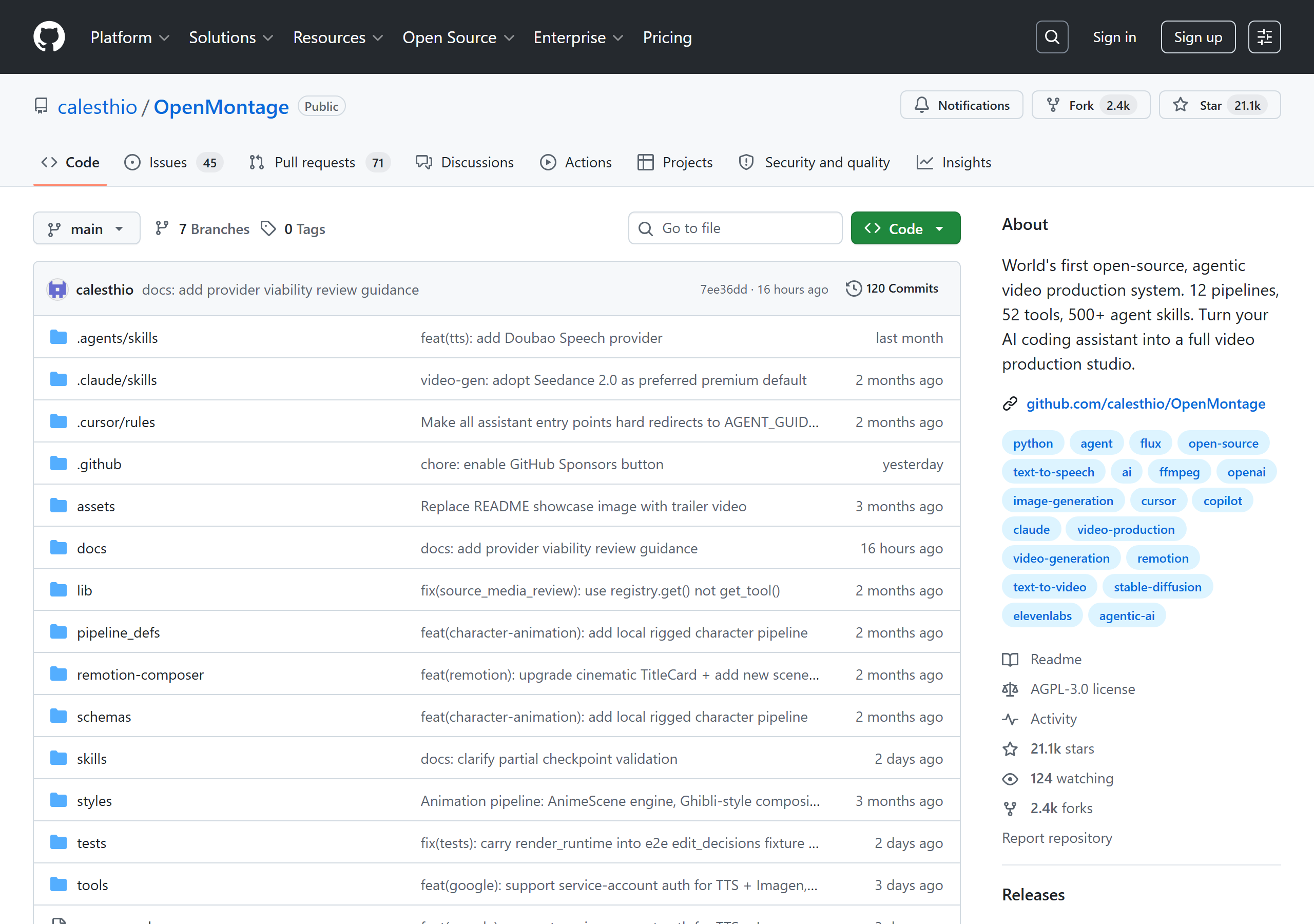
OpenMontage bills itself as the "World's first open-source, agentic video production system." In plain terms: it turns the AI coding assistant you already use — Claude Code, Cursor, Copilot, or Windsurf — into a complete video production studio. As the README puts it, "Turn your AI coding assistant into a full video production studio."
Most AI video tools spit out a single clip from a prompt. OpenMontage is different: it orchestrates an entire end-to-end pipeline — live research, scripting, asset generation, narration, music, editing, and final composition — the way a real production team would. The result is structured, multi-scene videos rather than one-off generations.
It's built by Calesthio AI Labs and, at the time of writing, has racked up over 21,000 GitHub stars — a signal of how much appetite there is for this idea.
The Problem It Solves
Producing even a short, polished video is a multi-step grind: research the topic, write a script, find or generate footage, record narration, add music, edit it all together, and review. Each step usually lives in a different tool.
OpenMontage collapses that whole workflow into a single conversation with your AI agent. You describe the video you want; the agent reads pipeline manifests, picks the right tools, generates or sources the assets, composes the result, self-reviews it, and presents it for your approval before the final render. It's the difference between a clip generator and a production pipeline.
Key Features
- 12 production pipelines — explainers, talking heads, documentaries, animations, trailers, and more.
- 52 production tools spanning video generation, image creation, text-to-speech, music, and post-production.
- Reference-driven creation — "Start From A Video You Already Love." Paste a video you like and get differentiated variants instead of starting from a blank page.
- Real-footage documentary pipeline that builds finished videos from actual motion footage sourced from free/open archives like Archive.org, NASA, and Wikimedia — no paid video-generation API required.
- 7-dimension provider scoring that picks tools by quality, cost, reliability, latency, and more.
- Production quality gates — pre-compose validation and post-render self-review.
- Budget controls with cost estimation and spend caps.
- A completely free pathway using Piper TTS, FFmpeg, Remotion, and free stock sources.
The Tech Stack
OpenMontage is mostly Python (~90%) with a TypeScript composition layer, and leans on mature open-source media tooling:
- Composition engines: Remotion (React-based) and HyperFrames (HTML/CSS/GSAP).
- Core infrastructure: FFmpeg, Node.js 18+, and Python 3.10+.
- Video providers: 14+ including Kling, Runway, and Google Veo, plus local models (WAN 2.1, Hunyuan, CogVideo).
- Image providers: 10+ including FLUX, Google Imagen, DALL·E 3, and local Stable Diffusion.
- TTS providers: ElevenLabs, Google TTS, OpenAI TTS, and Piper (free/local).
- Music: Suno AI and ElevenLabs Music.
The breadth of providers is the point — OpenMontage acts as an orchestration layer that scores and selects across them rather than locking you into one vendor.
Getting Started
After cloning the repository, setup is a single command:
make setup
From there, you describe your video to your AI assistant of choice. The README suggests prompts like:
- "Make a 60-second animated explainer about how neural networks learn"
- "Make a 90-second documentary montage about city life in rain. Use real footage only, no narration."
- "Here's a YouTube Short I love. Make something like this, but about CRISPR."
Behind the scenes, the agent reads pipeline YAML manifests and markdown skill files, calls Python tools with scored provider selection, self-reviews the output, and presents it for approval before rendering.
What You Get With Zero API Keys
One of the most compelling aspects is the zero-key workflow. Out of the box, OpenMontage can produce real videos using Piper TTS, FFmpeg, Remotion, and free stock sources — no paid accounts required. Optional API keys in .env unlock more powerful providers:
- Image/video gateway:
FAL_KEY(FLUX, Google Veo, Kling, Recraft) - Stock media:
PEXELS_API_KEY,PIXABAY_API_KEY,UNSPLASH_ACCESS_KEY - Voice/music:
ELEVENLABS_API_KEY,OPENAI_API_KEY,GOOGLE_API_KEY,SUNO_API_KEY - Local GPU: set
VIDEO_GEN_LOCAL_ENABLED=truefor free local video generation
How It Works: A Three-Layer Knowledge Architecture
OpenMontage separates what to do from how to do it across three layers the agent reads:
- Pipelines — YAML manifests defining the steps for each video type (explainer, documentary, trailer, etc.).
- Skills — markdown files describing how to use each of the 52 tools.
- Tools — the Python functions that actually generate images, footage, narration, music, and the final composition.
This is also why it works across assistants: dedicated instruction files exist for Claude Code (CLAUDE.md), Cursor (.cursor/rules/), GitHub Copilot (.github/copilot-instructions.md), Windsurf (.windsurfrules), and Codex (CODEX.md), all pointing at a shared AGENT_GUIDE.md and PROJECT_CONTEXT.md.
Real Demos and Their Cost
What makes the project credible is that the README publishes finished demos with their actual costs — a refreshing level of transparency in the AI-video space:
- "Signal from Tomorrow" — a sci-fi trailer using Veo clips and generated music.
- "The Last Banana" — a 60-second animated short for $1.33.
- "Void — Neural Interface" — a product ad for $0.69.
- "Candyland" — a Ghibli-style animation for $0.15.
Seeing sub-dollar production costs attached to named outputs makes the value proposition concrete rather than hypothetical.
Who Is It For?
OpenMontage targets anyone who needs video output but doesn't want a manual editing grind:
- Educators making explainers and tutorials.
- Marketers producing launch teasers and promo videos.
- Creators repurposing long-form content into social clips.
- Studios experimenting with brand films and cinematic trailers.
- Teams building video essays, documentary montages, or training content.
- Anyone needing multi-language localization and dubbing.
A Note on Licensing
OpenMontage is released under the GNU AGPLv3, a strong copyleft license. That's worth knowing if you plan to build a commercial service on top of it: AGPL's network-use clause means modifications served over a network must also be shared. For personal and open projects it's a non-issue; for SaaS, read the AGPLv3 terms carefully first.
Final Thoughts
OpenMontage is one of the more ambitious "agentic" projects to appear recently because it doesn't just wrap a single model — it builds a real, governed production pipeline with quality gates, budget caps, and provider scoring, then hands the controls to the AI assistant you already use. The free, zero-key pathway means you can try it without spending a cent, and the published per-video costs make the paid providers easy to reason about.
If you're curious about where AI agents go beyond code, this is a compelling place to look. Star it and read the docs on GitHub.
Related Reading
- Paca: The AI-Native, Open-Source Alternative to Jira — another open-source project built around AI agents as teammates.
- performative-ui: A Satirical Component Library for the AI Hype Era — a lighter take on the AI-native trend (and, like OpenMontage's Remotion layer, built on React).
- Why I Built My Own Tool Library — on the value of owning your own tooling.
- Browse all ToolShed tools — free, browser-based developer utilities.