Email.md: Write Responsive HTML Emails in Markdown
Published on June 17, 2026 by Wasim
What Is Email.md?
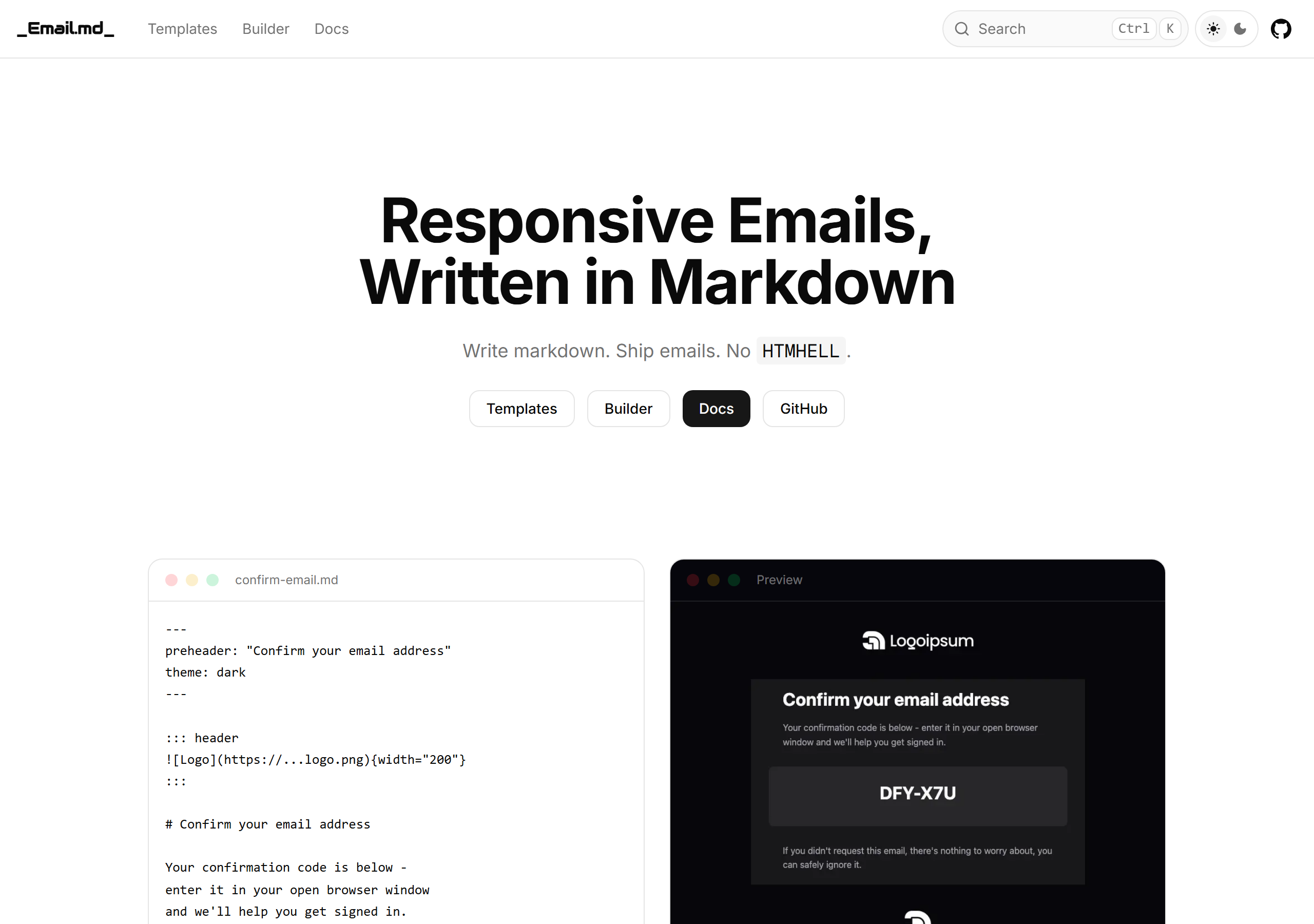
Email.md (the npm package emailmd) is an open-source tool that converts Markdown into responsive, email-safe HTML that renders correctly across Gmail, Outlook, Apple Mail, Yahoo and the rest. Its tagline says it all: "Write markdown. Ship emails. No HTMHELL."
If you have ever hand-coded an HTML email, you know the pain — nested tables, inline styles, ghost tables for Outlook, and a dozen rendering quirks per client. Email.md's pitch, straight from the docs, is that "email clients don't share a modern rendering engine." Instead of fighting that, you write plain Markdown and let the tool generate the bulletproof HTML for you. It's built by Anypost and licensed MIT.
The Problem It Solves
Email HTML is famously stuck in the past. A modern web page uses flexbox, grid and a single rendering engine; an email has to survive Outlook's Word-based renderer, Gmail's CSS stripping, and dark-mode color inversion — all at once. The result is the dreaded "HTMHELL": thousands of lines of table soup that nobody enjoys writing or maintaining.
Email.md removes that layer entirely. You author content the way you'd write a README, and it compiles down to the gnarly markup under the hood using MJML for "bulletproof rendering across all email clients." You also get a plain-text version automatically for the text/plain MIME part — a detail most hand-rolled emails skip.
Key Features
- Email-safe HTML — powered by MJML for cross-client rendering.
- Rich Markdown — tables, task lists, buttons, callouts, heroes, and more.
- Theming — light/dark themes, brand colors, and full customization.
- Frontmatter — override theme values and set metadata per-email.
- Directives — header, hero, callout, highlight, centered, and footer blocks.
- Automatic plain text — generated for the
text/plainMIME part. - Live Builder — a browser-based editor with instant preview.
- AI-friendly — full syntax published at
llms-full.txtso AI tools can author emails too.
How It Works
Install the package from npm:
npm install emailmd
Then render Markdown to both HTML and plain text with the API:
import { render } from "emailmd";

const { html, text } = await render(`
# Welcome!
Thanks for signing up.
[Get Started](https://example.com){button}
`);
Prefer the command line? There's a CLI too:
emailmd input.md                    # Render to HTML
emailmd input.md -o output.html     # Write to file
emailmd input.md --text             # Plain text output
The Markdown Syntax
The magic is in a small set of additions to standard Markdown. Directives use a ::: fenced-container syntax to create email-specific blocks:
::: header
{width="150"}
:::
::: hero https://example.com/hero.jpg
# Welcome aboard
Get started with your new account today.
:::
::: callout center compact bg=#eff6ff
**ABC-123**
:::
::: footer
**Acme Corp** · [Unsubscribe](https://example.com/unsub)
:::
The available directives are header, hero, callout, highlight, centered, and footer, each accepting parameters like center, compact, color=, bg=, and border-radius=.
Buttons are just Markdown links with a {button} attribute — including semantic variants and a plain-text fallback so the call to action survives in text-only clients:
[Get Started](https://example.com){button}
[Confirm Account](https://example.com/confirm){button.success}
[Reset Password](https://example.com/reset){button fallback}
Frontmatter (YAML, snake_case keys) controls theme and metadata per email:
---
preheader: "Don't miss our biggest sale"
theme: dark
brand_color: "#e11d48"
button_color: "#059669"
font_family: "Georgia, serif"
subject: "Welcome to Acme"
---
On top of that you get the Markdown you'd expect — tables, task lists, sized/aligned images ({width="400"}), blockquotes, and even ==highlight==, subscript and superscript.
Ready-Made Templates
If you'd rather start from a working example, Email.md ships eight open-source templates you can open directly in the Builder and customize:
- Welcome Email (Onboarding)
- Confirm Email (Onboarding)
- Password Reset (Security)
- Order Confirmation (E-Commerce)
- Invoice (Billing)
- Monthly Newsletter (Marketing)
- Review Roundup (Marketing)
- Rate Your Support (Feedback)
Each covers a common transactional or marketing scenario, so you can ship a polished email by editing copy rather than wrestling with markup.
The Live Builder
The Builder is a browser-based playground: write Markdown on one side, see the rendered, responsive email on the other in real time. It's the fastest way to learn the directive syntax and to tweak a template's theme colors before exporting the final HTML. The homepage demo shows exactly this — a confirm-email.md source next to its dark-themed rendered preview.
Who Is It For?
Email.md fits nicely if you're:
- A developer wiring up transactional emails (welcome, password reset, receipts) and tired of maintaining HTML templates.
- A marketer or founder who wants on-brand newsletters without a heavyweight ESP template editor.
- Building AI-generated email flows — the published
llms-full.txtsyntax reference makes it easy for an LLM to emit valid Email.md Markdown.
Final Thoughts
Email.md is a genuinely smart abstraction: it takes the one format developers already write fluently — Markdown — and routes it through MJML to solve a problem that has plagued email for two decades. The directive syntax is small enough to learn in an afternoon, the templates give you a running start, and the automatic plain-text output is the kind of detail that signals the authors have actually sent production email.
Find it at emailmd.dev or grab the source on GitHub.
Related Reading
- Markdown to HTML Converter — a fast, in-browser converter for general-purpose Markdown.
- HTML to Markdown Converter — go the other way and turn existing HTML into clean Markdown.
- Why I Built My Own Tool Library — on favoring small, focused, client-side tools.
- Browse more Guides — walkthroughs of developer tools and workflows.